

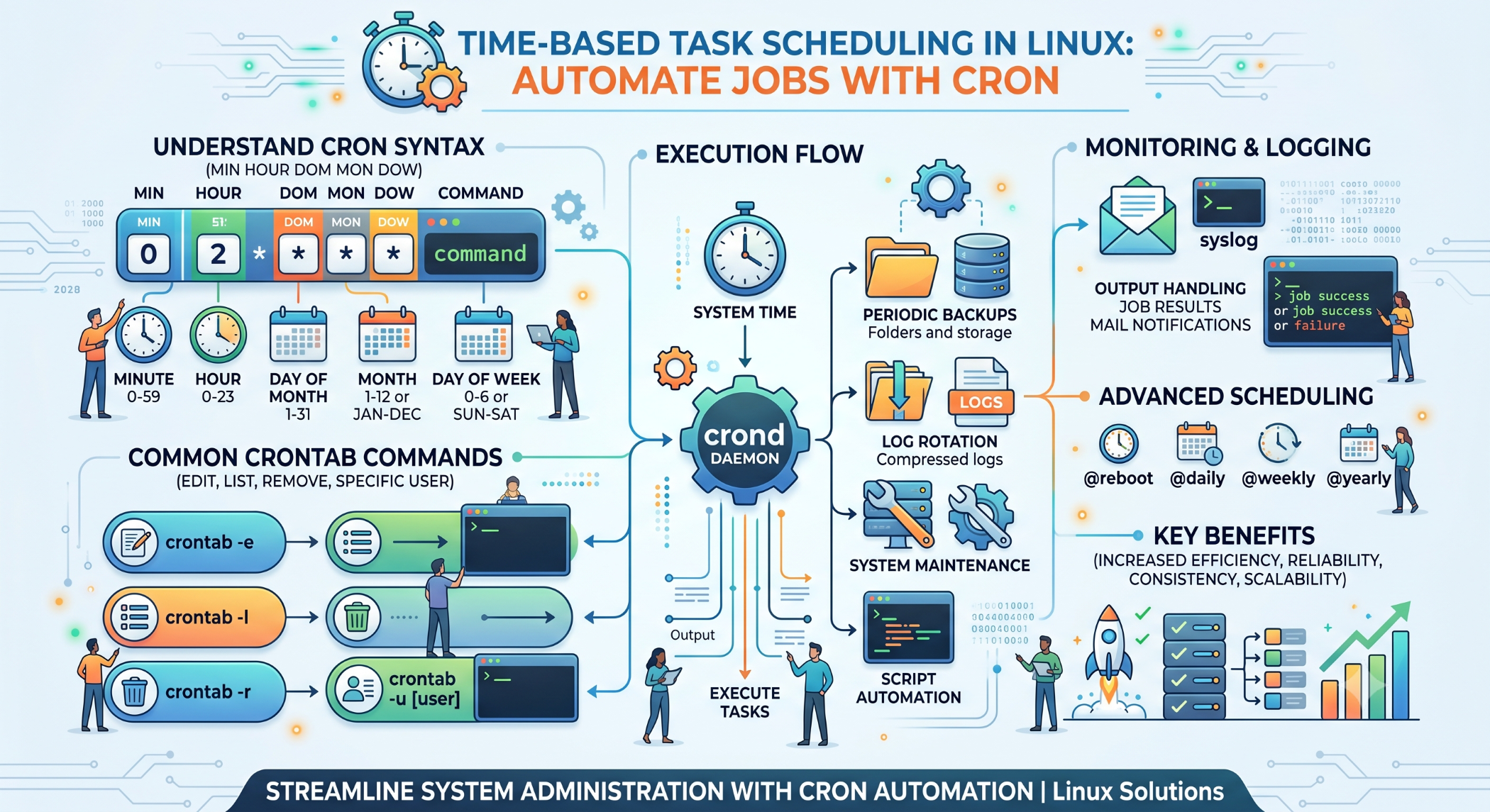
Time-Based Task Scheduling in Linux
Many server and application operations need to happen at specific times. Backups may need to run overnight, reports may need to be generated every morning, and cleanup scripts may need to execute regularly.
Time-based task scheduling allows Linux administrators and developers to automate these activities instead of performing them manually.
What Is Time-Based Scheduling?
Time-based scheduling means executing a command, script, or process according to a predefined schedule.
Linux commonly uses cron for this purpose. A cron job can be configured to run at a particular minute, hour, day, month, or day of the week.
A basic cron format is:
* * * * * commandThe five fields represent:
Minute Hour Day-of-month Month Day-of-weekSchedule a Daily Task
For example, a backup can be scheduled to run every day at 2:00 AM:
0 2 * * * /usr/local/bin/backup.shThis allows the backup operation to execute automatically without manual intervention.
Run Tasks at Regular Intervals
Cron also supports interval-based schedules.
For example, run a monitoring script every five minutes:
*/5 * * * * /usr/local/bin/check_status.shThis can be useful for lightweight monitoring and recurring application tasks.
Schedule Weekly and Monthly Jobs
A weekly report could be scheduled for Monday morning:
0 9 * * 1 /usr/local/bin/report.shA monthly cleanup task could run on the first day of every month:
0 1 1 * * /usr/local/bin/cleanup.shThese schedules reduce the need for repetitive manual administration.
Manage Time-Based Jobs With Crontab
The crontab command allows users to manage their scheduled tasks.
To edit the current user's cron jobs:
crontab -eTo view configured jobs:
crontab -lAdministrators can manage another user's crontab when appropriate by using the required privileges.
Use Absolute Paths
Cron jobs run in a limited environment and may not have the same PATH or working directory as an interactive shell.
For example, use:
0 2 * * * /usr/bin/php /var/www/app/backup.phprather than relying on a relative command such as:
0 2 * * * php backup.phpAbsolute paths make scheduled tasks more reliable.
Log Scheduled Tasks
Important scheduled operations should produce logs.
For example:
0 2 * * * /usr/local/bin/backup.sh >> /var/log/backup.log 2>&1This stores both normal output and error messages in a log file.
Logging helps administrators determine whether a scheduled task completed successfully.
Common Time-Based Automation
Linux time-based scheduling is commonly used for:
- Database backups
- File backups
- Log cleanup
- Report generation
- Data synchronization
- Temporary-file cleanup
- Monitoring scripts
- Application maintenance
For example, an application can automatically generate a daily report and send it to an internal team.
Avoid Overlapping Jobs
A scheduled task may take longer to complete than expected. If the next execution starts before the previous one finishes, multiple instances may run simultaneously.
This can cause excessive CPU, memory, or database usage.
For long-running tasks, use an appropriate locking or concurrency mechanism to ensure that jobs do not overlap unexpectedly.
Time Zones and Scheduled Jobs
Time-based automation becomes especially important when servers and users operate across different regions.
Administrators should know which time zone the server and scheduling environment use and define schedules accordingly.
This is particularly important for applications that serve international customers or perform time-sensitive business operations.
Cron and Application Schedulers
Cron is useful for operating-system-level scheduled tasks, but modern applications may also provide their own scheduling systems.
For example, a PHP framework or cloud platform may provide application-specific scheduling features.
The best choice depends on whether the task belongs to the operating system, the application, or a broader distributed workflow.
Best Practices
Define schedules clearly, use absolute paths, apply the minimum required permissions, and log important jobs.
Test scheduled commands manually before adding them to cron. For critical tasks such as backups, also verify that the resulting data is usable and periodically perform restore tests.
Conclusion
Time-based scheduling helps Linux systems automate repetitive tasks reliably. With cron and crontab, developers and administrators can schedule backups, reports, maintenance scripts, monitoring tasks, and other operations.
A dependable scheduling strategy requires more than setting a time. Correct scheduling, permissions, logging, error handling, time-zone awareness, and monitoring all contribute to reliable automation.


