

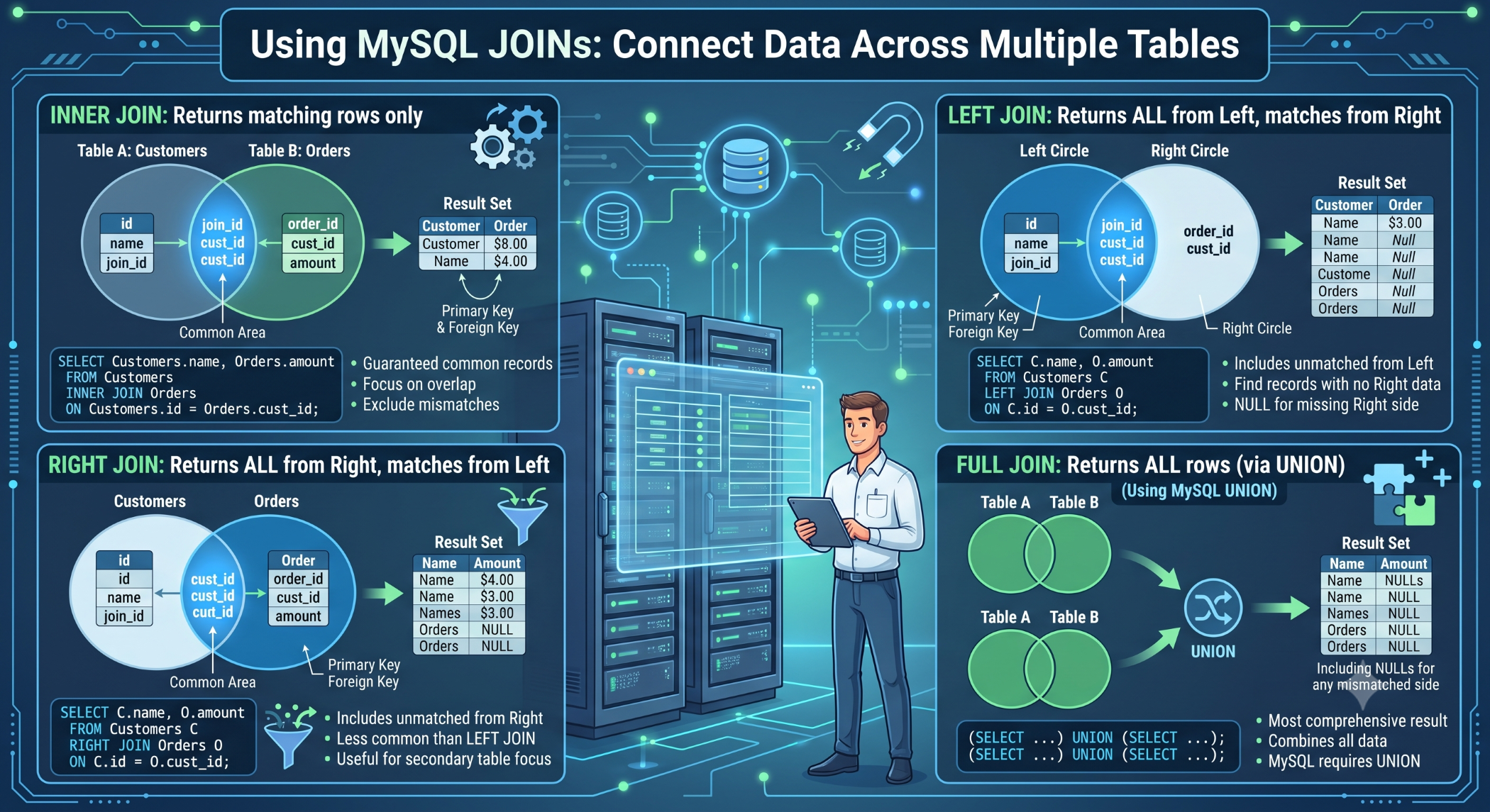
Using MySQL JOINs: Connect Data Across Multiple Tables
Relational databases typically store information across multiple tables to keep data organized and reduce duplication. When an application needs information from more than one table, MySQL JOINs allow developers to combine related records in a single query.
JOINs are fundamental to database-driven applications such as e-commerce platforms, CRM systems, booking applications, and business management software.
What Is a MySQL JOIN?
A JOIN combines rows from two or more tables based on a related column.
For example, consider these tables:
customers
----------------------
id | name | email
orders
----------------------
id | customer_id | total
The customer_id column in the orders table connects an order to a customer.
A JOIN can retrieve both pieces of information together.
INNER JOIN
INNER JOIN returns only records where a matching value exists in both tables.
SELECT
customers.name,
orders.id,
orders.total
FROM customers
INNER JOIN orders
ON orders.customer_id = customers.id;
This returns customers who have matching orders.
It is useful when only related records are required.
LEFT JOIN
A LEFT JOIN returns all rows from the left table and matching rows from the right table.
SELECT
customers.name,
orders.id,
orders.total
FROM customers
LEFT JOIN orders
ON orders.customer_id = customers.id;
This can return all customers, including customers who have not placed any orders.
For a customer without an order, the order columns will contain NULL.
RIGHT JOIN
A RIGHT JOIN returns all rows from the right table and matching rows from the left table.
SELECT
customers.name,
orders.id,
orders.total
FROM customers
RIGHT JOIN orders
ON orders.customer_id = customers.id;
Although supported by MySQL, many developers prefer restructuring the query and using a LEFT JOIN because it can be easier to read.
CROSS JOIN
A CROSS JOIN produces a Cartesian product, meaning each row from one table is combined with every row from the other table.
SELECT *
FROM colors
CROSS JOIN sizes;
This can be useful for generating combinations, but it can also produce a very large result set if the source tables contain many rows.
Joining More Than Two Tables
MySQL allows multiple JOINs in one query.
For example, an e-commerce application may have customers, orders, and order items:
SELECT
customers.name,
orders.id AS order_id,
order_items.product_id,
order_items.quantity
FROM customers
JOIN orders
ON orders.customer_id = customers.id
JOIN order_items
ON order_items.order_id = orders.id;
This allows related information from several tables to be retrieved together.
JOIN With WHERE
You can use WHERE to filter the rows returned by a JOIN.
SELECT
customers.name,
orders.total
FROM customers
JOIN orders
ON orders.customer_id = customers.id
WHERE orders.total > 1000;
This returns matching orders with totals greater than 1000.
JOIN With GROUP BY
JOINs are frequently combined with aggregate functions for reports.
For example:
SELECT
customers.id,
customers.name,
COUNT(orders.id) AS order_count
FROM customers
LEFT JOIN orders
ON orders.customer_id = customers.id
GROUP BY customers.id, customers.name;
This can provide the number of orders associated with each customer.
JOIN Using Foreign Keys
JOINs commonly use foreign-key relationships.
For example:
CREATE TABLE orders (
id INT PRIMARY KEY AUTO_INCREMENT,
customer_id INT,
FOREIGN KEY (customer_id)
REFERENCES customers(id)
);
The foreign key establishes the relationship, while the JOIN retrieves related information when needed.
JOIN Performance
JOIN performance becomes increasingly important as tables grow.
Make sure columns used for joins are appropriately indexed where necessary:
CREATE INDEX idx_orders_customer_id
ON orders(customer_id);
Use EXPLAIN to understand how MySQL executes important JOIN queries:
EXPLAIN
SELECT
customers.name,
orders.total
FROM customers
JOIN orders
ON orders.customer_id = customers.id;
Performance should always be evaluated using real data and actual application workloads.
Avoid Unnecessary JOINs
Joining additional tables increases query complexity and can increase the amount of data MySQL needs to process.
Only join tables that are required for the result.
Instead of retrieving every column, select only the fields the application needs:
SELECT
customers.name,
orders.total
FROM customers
JOIN orders
ON orders.customer_id = customers.id;
MySQL JOIN Best Practices
Understand the relationship between tables before writing the query. Use clear aliases when queries involve many tables, index appropriate JOIN columns, select only required fields, and use EXPLAIN when investigating performance.
Be particularly careful with LEFT JOIN, RIGHT JOIN, and filtering conditions because moving a filter between the ON and WHERE clauses can change the result.
MySQL JOINs at Solace Infotech
Solace Infotech works with MySQL and database-driven web applications, where relational data often needs to be retrieved across customers, products, orders, transactions, content, and other business entities.
Well-designed JOIN queries, indexing, database relationships, and query optimization can help support scalable application performance.
Conclusion
MySQL JOINs provide a powerful way to work with related information stored across multiple tables. INNER JOIN, LEFT JOIN, RIGHT JOIN, and CROSS JOIN each serve different purposes and should be selected according to the required result.
By understanding table relationships, using appropriate indexes, limiting retrieved data, and analyzing important queries with EXPLAIN, developers can create SQL that is both effective and maintainable.


