

Introduction
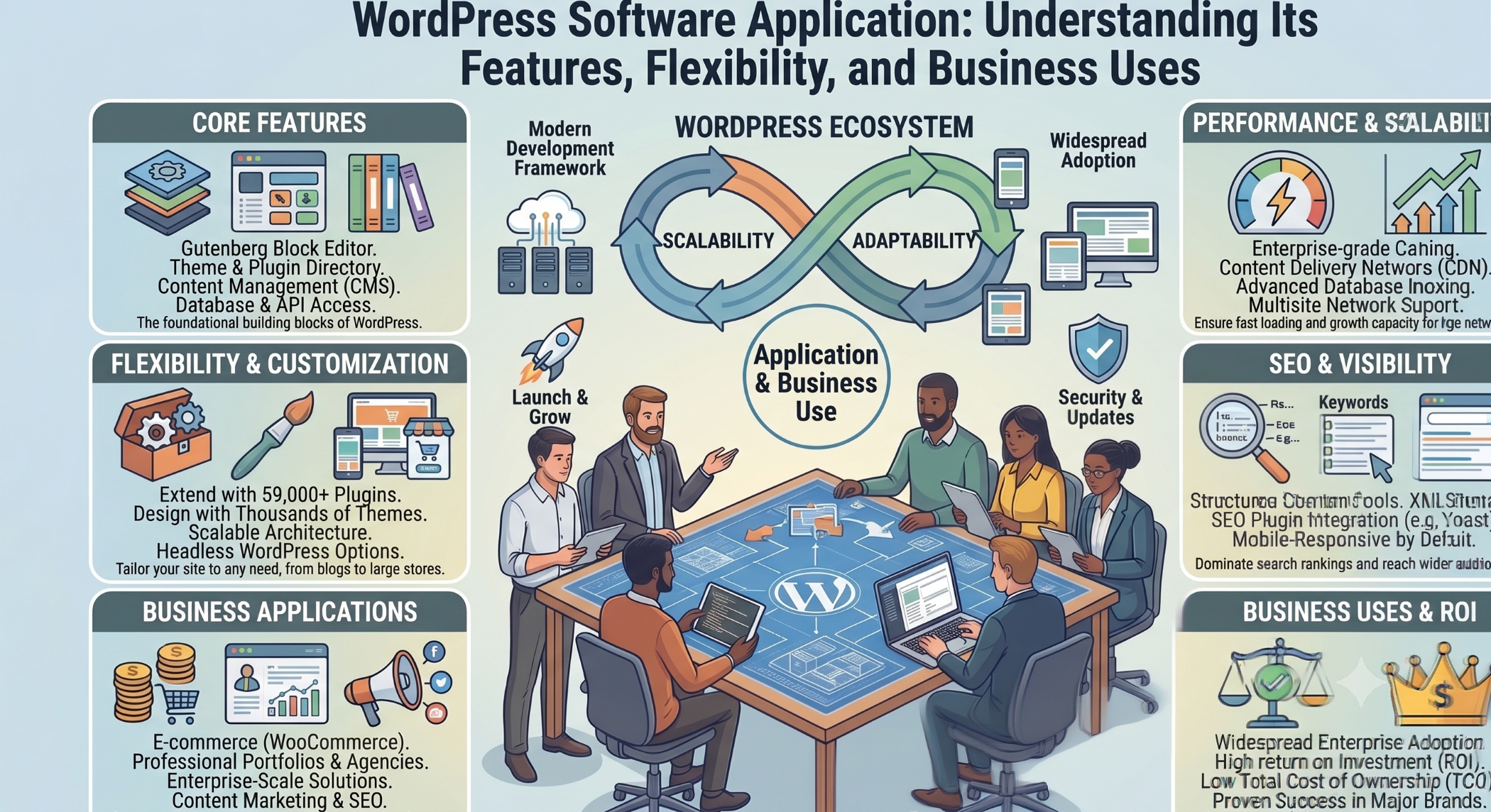
WordPress is one of the most recognized platforms for creating and managing websites. While it began as a publishing platform, its flexible architecture and extensive ecosystem have made it suitable for many types of digital applications.
Today, businesses use WordPress for corporate websites, blogs, online stores, membership platforms, publishing portals, customer-facing websites, and customized solutions.
The official WordPress documentation describes the platform as software that can be used to create blogs and websites, while its developer ecosystem provides APIs, themes, plugins, and other tools for extending its functionality.
What Is a WordPress Software Application?
A WordPress software application is a web-based application built using WordPress as its content-management and application foundation.
At its core, WordPress provides functionality for managing content, users, media, settings, themes, plugins, and other website components.
Developers can then extend that foundation to create functionality specific to a business or application.
For example, a company could use WordPress to build:
A corporate website
A publishing platform
An e-commerce website
A membership portal
A directory application
An educational website
A customer portal
A booking platform
A content-driven web application
The actual capabilities depend on the architecture, plugins, integrations, and custom development implemented for the project.
How WordPress Works
WordPress provides a combination of core software, themes, plugins, database functionality, and APIs.
The WordPress core provides the underlying platform.
Themes control much of the presentation and structure of the website.
Plugins add or modify functionality.
The database stores content and application information.
APIs allow WordPress to communicate with other systems and applications.
This modular approach allows a basic WordPress installation to evolve into a much more specialized application.
WordPress maintains extensive documentation covering installation, publishing, customization, maintenance, security, and development.
WordPress as a Software Platform
One reason WordPress can be considered a software platform rather than simply a blogging tool is its extensibility.
Developers can create custom plugins, themes, blocks, integrations, and application functionality.
The WordPress developer ecosystem provides resources for theme development, plugin development, APIs, REST interfaces, WP-CLI, and other technical capabilities.
This gives businesses the option of starting with standard functionality and extending it as their requirements become more sophisticated.
WordPress Themes
Themes determine how a WordPress website appears and behaves from a presentation perspective.
They can control layouts, templates, navigation, typography, responsive behavior, and other visual elements.
A business can select an existing theme to speed up development or create a custom theme for a unique brand and user experience.
Custom themes can be especially useful when the website requires a highly specific design or business workflow.
WordPress Plugins
Plugins are one of the most important parts of the WordPress ecosystem.
They can extend WordPress with features such as contact forms, search, analytics, SEO functionality, e-commerce, security, membership management, caching, integrations, and custom business processes.
Because plugins can modify and extend WordPress functionality, businesses should evaluate them carefully for security, maintenance, compatibility, performance, and long-term support.
WordPress Database
A WordPress installation relies on a database to store information such as posts, pages, users, settings, comments, and other application data.
Custom applications may also introduce additional tables or data structures depending on the requirements.
Good database design is important for performance and scalability, particularly when a WordPress implementation handles large amounts of content or transactional information.
Database optimization may involve appropriate indexing, efficient queries, data organization, caching, and regular maintenance.
WordPress and Content Management
Content management remains one of WordPress's core strengths.
Administrators and content teams can create and edit pages, publish articles, manage media, organize content, and control website structures through the administrative interface.
This makes WordPress particularly useful for businesses where content changes frequently.
Marketing teams, editors, and other business users can manage many routine content operations without requiring a developer for every update. WordPress's official getting-started documentation specifically covers publishing and content-management workflows.
WordPress for Business Websites
Businesses can use WordPress to create professional websites containing company information, services, products, case studies, blogs, contact forms, and lead-generation functionality.
Additional integrations can connect the website to CRM systems, email marketing platforms, analytics tools, customer-support systems, and other business applications.
This allows WordPress to become part of a broader digital ecosystem rather than operating as an isolated website.
WordPress for E-Commerce
WordPress can be extended into an e-commerce software application using dedicated commerce platforms and plugins.
E-commerce functionality can include:
Product catalogs
Shopping carts
Customer accounts
Checkout
Payments
Inventory management
Order management
Shipping integration
Promotions and discounts
For businesses with specialized requirements, custom development can extend standard e-commerce functionality to support unique pricing models, workflows, and integrations.
WordPress as a Membership Application
WordPress can also support membership-based applications.
A membership system may include user registration, login, subscription access, protected content, user profiles, account management, and role-based functionality.
Custom development can further extend these features into business-specific workflows.
This makes WordPress useful for online communities, professional organizations, educational platforms, and subscription-based services.
WordPress for Customer Portals
Businesses can build customer-facing portals using WordPress as part of the application architecture.
A portal could allow customers to log in, view account information, download documents, submit requests, track activities, or interact with specific business services.
Such solutions often require custom authentication, role management, APIs, database structures, and integrations.
WordPress and REST API
The WordPress REST API is an important capability for software applications.
It allows external applications to interact programmatically with WordPress resources using HTTP and structured data.
This can support integrations with mobile applications, custom JavaScript frontends, external systems, and other services. WordPress maintains dedicated REST API documentation for developers building these types of integrations.
Headless WordPress Applications
WordPress can also function as a headless content-management backend.
In a headless architecture, WordPress manages content while a separate frontend application presents it to users.
For example, a business could use WordPress to manage content while using React or another frontend technology to deliver the user interface.
This approach can be useful when a business wants the content-management capabilities of WordPress combined with a highly customized frontend.
Custom WordPress Software Development
Standard WordPress features are enough for many websites, but more complex business requirements may need custom development.
Custom WordPress development can include:
Custom plugins
Custom themes
Custom blocks
Custom dashboards
Advanced user roles
API integrations
Business workflows
Custom reporting
Third-party system integrations
Automated processes
This allows WordPress to be adapted to business-specific requirements instead of forcing the organization to change its workflow around standard functionality.
WordPress and APIs
Modern businesses often rely on multiple systems.
A WordPress application may need to communicate with CRM software, ERP systems, payment gateways, shipping providers, marketing platforms, cloud services, or mobile applications.
WordPress provides common APIs and HTTP capabilities that developers can use when building integrations. Its developer documentation includes REST APIs, database interfaces, HTTP requests, authentication, security, and other APIs.
Good API architecture should include appropriate authentication, authorization, validation, error handling, monitoring, and rate management.
WordPress Security
Security is critical when WordPress is used as a business software application.
The platform, themes, plugins, hosting environment, credentials, integrations, and application code all need appropriate protection.
WordPress provides dedicated security and maintenance guidance covering areas such as updates, passwords, privacy, and site protection.
Important practices can include:
Keeping core software and dependencies updated
Using strong authentication
Restricting administrator access
Using HTTPS
Maintaining regular backups
Monitoring suspicious activity
Reviewing plugin security
Applying appropriate access controls
Security should be treated as an ongoing process rather than a one-time configuration.
WordPress Performance
A WordPress software application must also be designed with performance in mind.
Large media files, excessive plugins, inefficient queries, poorly optimized themes, third-party scripts, and inadequate hosting can affect performance.
Performance optimization can include:
Image optimization
Caching
Database optimization
CDN integration
Efficient code
Reduced third-party requests
Appropriate hosting infrastructure
Application monitoring
The right optimization strategy should be based on actual performance measurements rather than simply installing multiple optimization tools.
WordPress Scalability
WordPress can support applications of different sizes, but scalability depends heavily on implementation.
As traffic and data increase, businesses may need to optimize the database, introduce caching, improve infrastructure, use a CDN, optimize application code, and review plugin architecture.
A scalable WordPress application should be designed according to realistic traffic, content, integration, and business requirements.
WordPress and Mobile Applications
WordPress can also act as the backend or content-management system for mobile applications.
A mobile application can communicate with WordPress through APIs to retrieve or submit appropriate content and data.
For example, a publishing application could retrieve articles from WordPress, while a membership application could interact with WordPress-managed user data through an appropriate API architecture.
This provides another way to extend WordPress beyond a traditional browser-based website.
WordPress for Publishing
Publishing remains one of the strongest WordPress use cases.
Organizations can use it to manage blogs, news portals, magazines, industry publications, knowledge bases, and other content-heavy websites.
Its content-management capabilities can simplify editorial workflows, publishing, categorization, media management, and content organization.
WordPress for Education
Educational organizations can also use WordPress as a foundation for digital learning platforms.
Depending on the implementation, an educational application could provide course content, user accounts, protected material, quizzes, assessments, announcements, and learning resources.
Specialized plugins or custom development can extend WordPress to accommodate more complex education workflows.
WordPress for Booking Applications
WordPress can be customized to support booking and scheduling functionality.
Examples include appointment booking, event registration, service scheduling, room reservations, or consultation requests.
Such applications may require calendars, availability management, notifications, payments, user accounts, and integrations with external systems.
Benefits of Using WordPress as a Software Application
WordPress provides several advantages for suitable business requirements.
Flexible: The platform can be customized through themes, plugins, APIs, and custom development.
Content-friendly: Non-technical users can manage content through the administration interface.
Extensible: Additional functionality can be introduced without rebuilding the entire platform.
Integration-ready: APIs allow WordPress to communicate with other applications and services.
Developer ecosystem: Official developer resources cover themes, plugins, APIs, blocks, WP-CLI, and other capabilities.
Suitable for different business models: WordPress can support publishing, e-commerce, membership, corporate websites, and specialized web applications.
Challenges of WordPress Applications
WordPress is flexible, but it is not automatically the right choice for every software application.
Poorly maintained plugins can increase security and compatibility risks.
Too many plugins can introduce unnecessary complexity.
Large applications may require custom performance and infrastructure strategies.
Highly specialized enterprise systems may be better served by a custom framework or another technology depending on their requirements.
Businesses should therefore choose WordPress based on the actual problem to be solved rather than treating it as a universal solution.
WordPress vs Custom Framework Development
A WordPress application and a custom framework application serve different purposes.
WordPress provides many ready-made capabilities, particularly for content management and common website functionality.
A custom framework provides greater control over application architecture and can be more suitable for highly specialized systems.
The right choice depends on requirements such as:
Content management needs
Application complexity
Customization requirements
Scalability
Security
Development speed
Integration requirements
Long-term maintenance
When Should a Business Use WordPress?
WordPress can be a practical choice when content management is an important part of the application and the business benefits from an established ecosystem.
It can be particularly useful for corporate websites, content platforms, blogs, publishing sites, marketing websites, e-commerce solutions, membership platforms, and applications with moderate customization requirements.
For highly specialized systems, the architecture should be evaluated carefully before selecting the platform.
Future of WordPress Software Applications
WordPress continues to evolve as both a publishing platform and a development ecosystem.
Its official developer resources include REST APIs, block development, themes, plugins, WP-CLI, common APIs, and other tools that enable developers to build increasingly customized solutions.
This evolution allows businesses to combine traditional content management with modern application development.
As APIs, headless architectures, cloud infrastructure, automation, and AI-enabled features become increasingly common, WordPress can serve as one component within a broader digital architecture.
How Solace Infotech Can Help
Solace Infotech provides WordPress development capabilities for businesses looking to create, customize, integrate, and maintain WordPress-based solutions.
Its publicly listed work also includes projects using WordPress alongside technologies such as PHP, JavaScript, and jQuery.
For a business application, the development process should begin with understanding the business requirement, followed by architecture planning, UI/UX design, WordPress configuration, custom development, integration, testing, security, deployment, and ongoing maintenance.
Conclusion
WordPress is much more than a blogging platform. It can serve as the foundation for many types of software applications when its capabilities are matched appropriately to business requirements.
Its combination of content management, themes, plugins, APIs, and custom development provides flexibility for organizations that need to build digital experiences without starting every feature from scratch.
At the same time, WordPress applications require thoughtful architecture, security, performance management, plugin selection, and ongoing maintenance.
When these areas are handled correctly, WordPress can provide a practical foundation for corporate websites, e-commerce solutions, portals, publishing platforms, membership applications, and customized business software.


